Merge, stack, and consolidate data across spreadsheets with a robust API!
- Add and update data in the main sheet
- Output results to a new spreadsheet
- Insert extra rows for multiple matches
- Track updates in a status column
- Fill only empty cells
- Skip empty source values
- Clear background in updated columns
- Color updated cells
It’s the perfect solution for inventory sync, CRM updates, financial reporting, and any other data-intensive task.
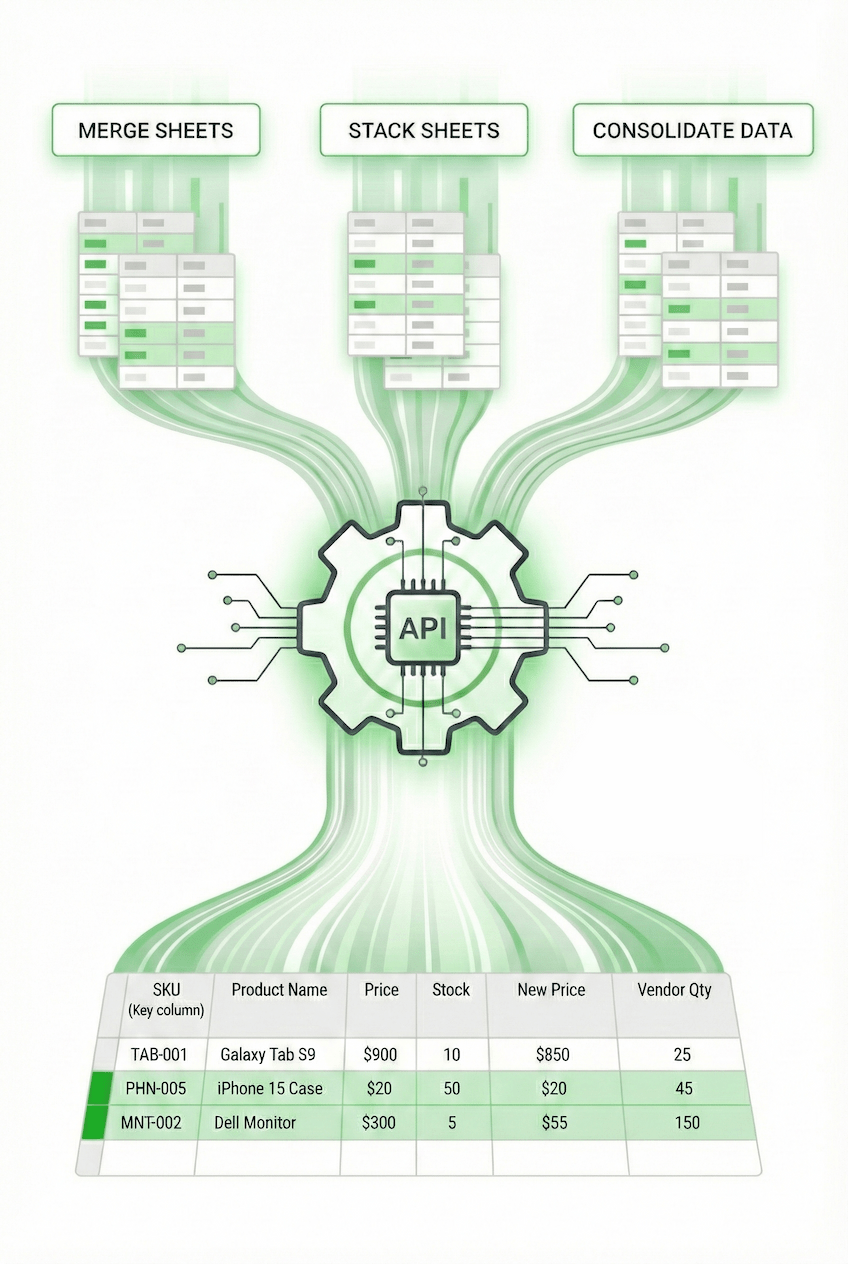
Data operations made simple
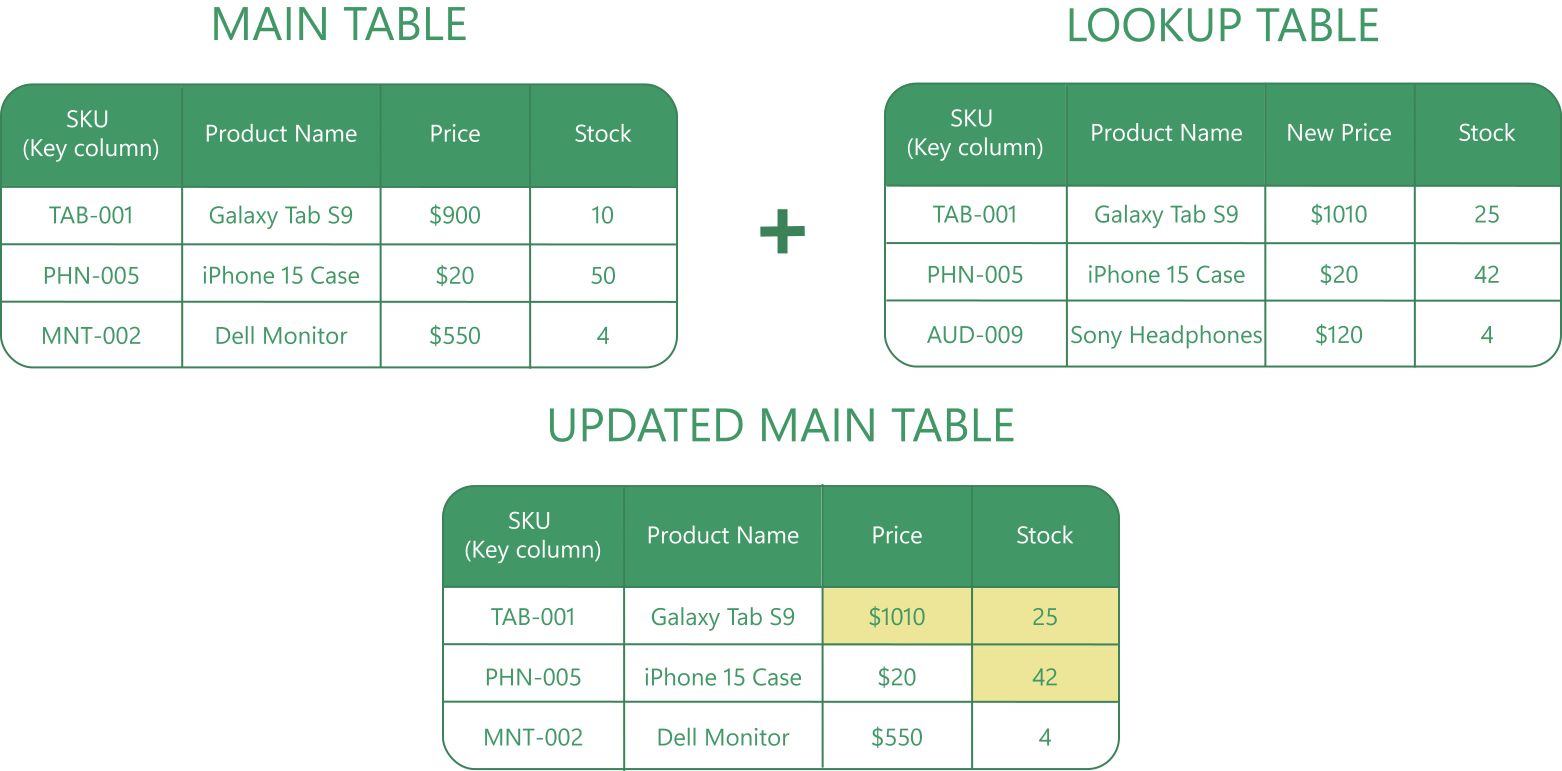
Smart sync with every merge!
Data doesn't sit still. Vendor prices shift, stock levels fluctuate, and lead statuses change. Whether you’re running a local family shop or a massive distribution center, hunting for these changes manually in your spreadsheets is tedious and time-consuming.
Instead, simply match rows by key columns. The API detects differences to update only the changed values in your master sheet and capture new records from the lookup sheets. It refreshes what you have and keeps your data 100% accurate.
Send your data as a simple JSON payload and our engine updates it automatically:
{
  "tool": 7,
  "name": "My Merge Scenario",
  "license": "YOUR_LICENSE_KEY",
  "payload": {
    "oMergeRules": {
      "bIsMasterSheetBackupRequired": false,
      "sSpreadsheetId": "1Sfpqweb4r5f73q04867fgqw90364fg946wqfowefuhk",
      "bMainHasHeaders": true,
      "bLookupHasHeaders": true,
      "bIgnoreBlanks": false,
      "bMatchCase": false,
      "bAddNonMatchingRows": true,
      "bAddStatusColumn": false,
      "bUpdateEmptyCells": false,
      "bUpdateIfLookupCellsContainData": false,
      "bPlaceResultToMainTable": true,
      "bPlaceResultToNewSpreadsheet": false,
      "bMergeNotes": true,
      "bInsertAdditionalRowsAtEnd": false,
      "bInsertAdditionalRowsAfterMainRow": false,
      "bClearBackgroundColor": false,
      "bUpdatedCellsSetBackgroundColor": true,
      "sUpdatedCellsBackgroundColor": "#EDE698",
      "bUpdateValuesInActionRequired": false
  },
  "oMainSheet": {
      "sSpreadsheetName": "Tech_Store_Inventory",
      "sSpreadsheetId": "1Sfpqweb4r5f73q04867fgqw90364fg946wqfowefuhk",
      "sSheetName": "Main_Stock",
      "sA1Notation": "A1:D100"
  },
  "aLookupSheets": [
      {
          "sSheetName": "Vendor_Updates",
          "sSpreadsheetId": "1sdfkwn34scrt843r19x4asdf23fn23asdfufg",
          "sSpreadsheetName": "Vendor_Incoming_File",
          "sA1Notation": "A1:D50"
      }
  ],
  "aMatchingColumnsMapping": [
      [
          "SKU",
          "SKU"
      ]
  ],
  "aUpdateValueMapping": [[
          "Product Name",
          "Product Name"
      ],[
          "Price",
          "New_Price"
      ], [
          "Stock",
          "Stock"
      ]],
  "aAddToEndList": [],
  "sScenarioName": "Update Inventory: Prices & Stock",
  "migrateVersion": 2
  }
}
In this example: The JSON payload instructs the API to merge "Vendor_Updates" into the "Tech_Store_Inventory" master sheet. It matches records using the "SKU" key column. The configuration maps "New Price" values to update the "Price" column and refreshes data in the "Stock" column.
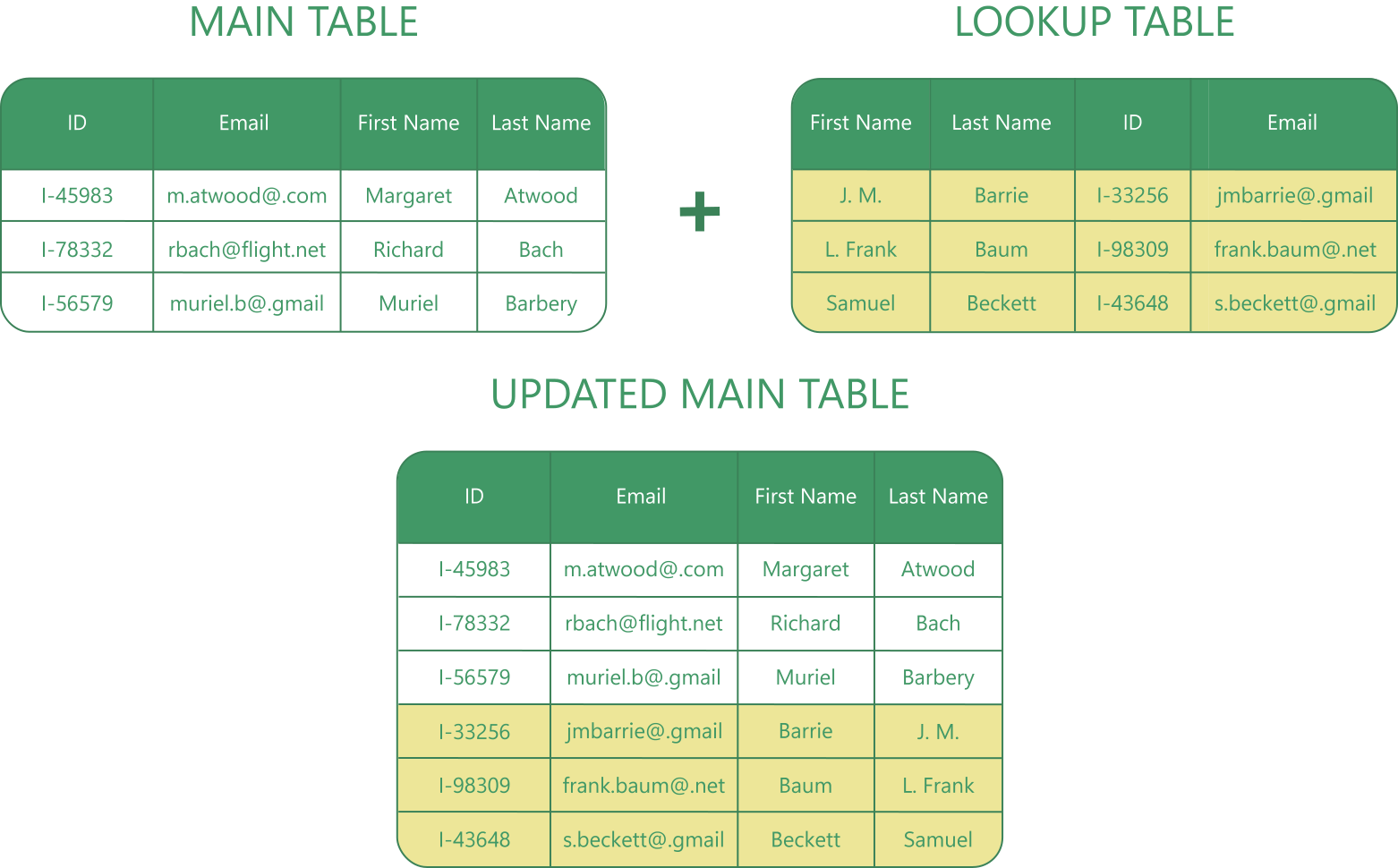
Stack scattered data into one master sheet!
Complex data is often scattered across different files. For example, "Contact Info" might be in Column B in one sheet, but in Column D in another. Manually stitching data together risks row misalignment and data corruption.
To avoid this, use the Merge Sheets API. Just match columns by header name or position, and the API seamlessly stacks data at the bottom of your master sheet perfectly aligned.
Define the column mapping in a simple JSON payload and our API aligns and stacks everything automatically:
{
  "tool": 7,
  "name": "Database Scenario",
  "license": "YOUR_LICENSE_KEY",
  "payload": {
    "oMergeRules": {
      "bIsMasterSheetBackupRequired": false,
      "sSpreadsheetId": "1Sfpqweb4r5f73q04867fgqw90364fg946wqfowefuhk",
      "bMainHasHeaders": true,
      "bLookupHasHeaders": true,
      "bIgnoreBlanks": true,
      "bMatchCase": false,
      "bAddNonMatchingRows": true,
      "bAddStatusColumn": false,
      "bUpdateEmptyCells": false,
      "bUpdateIfLookupCellsContainData": false,
      "bPlaceResultToMainTable": true,
      "bPlaceResultToNewSpreadsheet": false,
      "bMergeNotes": true,
      "bInsertAdditionalRowsAtEnd": true,
      "bInsertAdditionalRowsAfterMainRow": false,
      "bClearBackgroundColor": false,
      "bUpdatedCellsSetBackgroundColor": true,
      "sUpdatedCellsBackgroundColor": "#EDE698",
      "bUpdateValuesInActionRequired": false
  },
  "oMainSheet": {
      "sSpreadsheetName": "Client_Database",
      "sSpreadsheetId": "1Sfpqweb4r5f73q04867fgqw90364fg946wqfowefuhk",
      "sSheetName": "Main_List",
      "sA1Notation": "A1:D100"
  },
  "aLookupSheets": [
      {
          "sSheetName": "Imported_Database",
          "sSpreadsheetId": "1sdfkwn34scrt843r19x4asdf23fn23asdfufg",
          "sSpreadsheetName": "Restored_Data",
          "sA1Notation": "A1:D50"
      }
  ],
  "aMatchingColumnsMapping": [
      [
          "ID",
          "ID"
      ],
  "aUpdateValueMapping": [
          "Email",
          "Email"
      ],
[
          "First Name",
          "First Name"
      ],
[
          "Last Name",
          "Last Name"
      ],
  ],

  "aAddToEndList": [],
  "sScenarioName": "Stack New Client Database",
  "migrateVersion": 2
  }
}
In this example: The JSON payload instructs the API to scan the "Imported_Database" for new records. Even though columns like "Email" or "First Name" may be in different positions in the source file, the API uses the header names to correctly map the data and append the new rows to the bottom of the "Main_List".
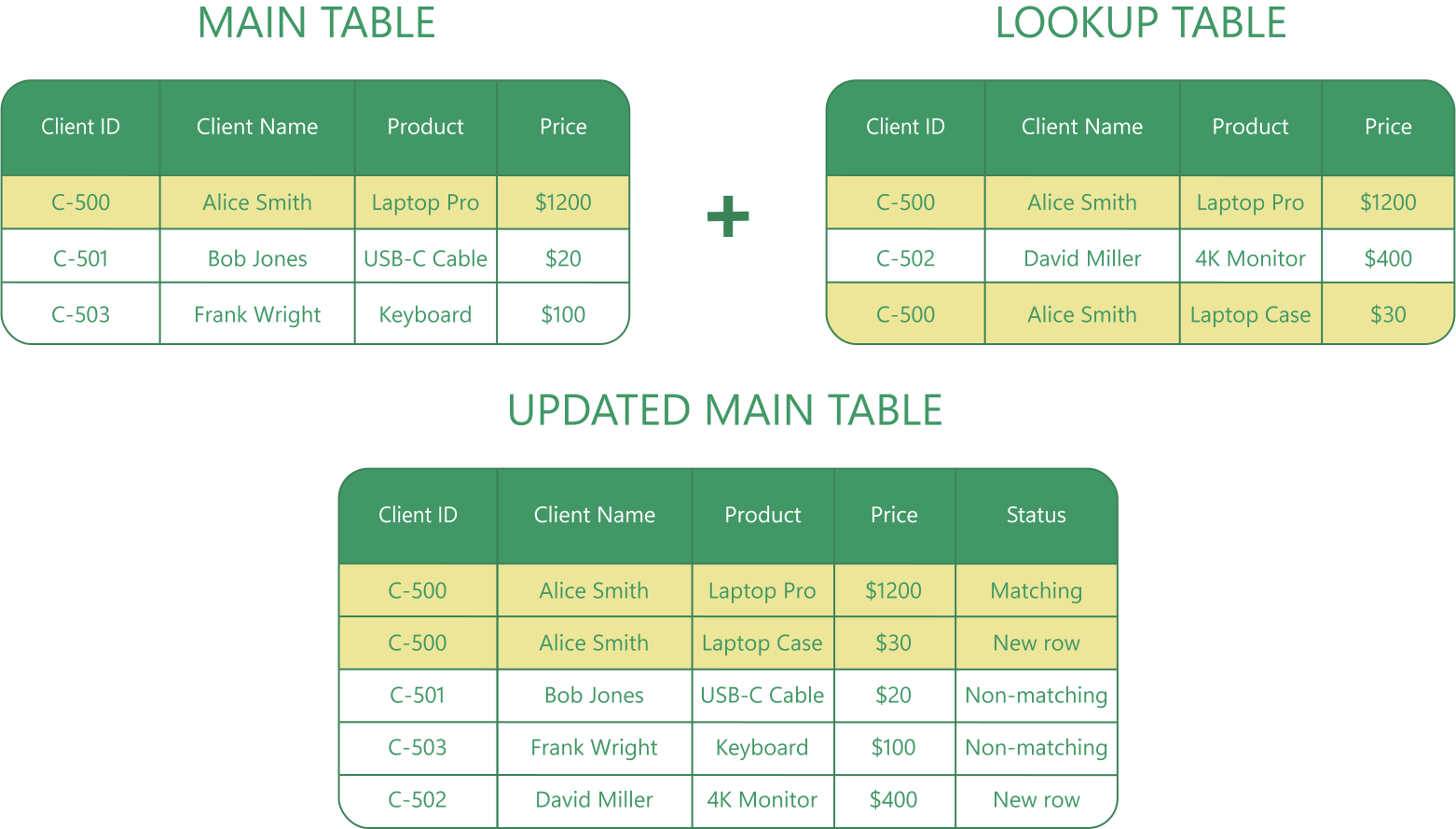
Handle duplicates and track every change!
Real-world data is rarely simple. A single customer often has multiple orders, and project logs contain repeated entries. Standard spreadsheet formulas usually stop at the first match, hiding the rest of the story and leaving you with incomplete records.
Instead, let the API handle the complexity. It detects repeating keys to ensure no data is lost. The API automatically inserts additional rows right after the match or at the end of the table, preserving the full history of every transaction. Plus, with the Status Column, you see exactly what happened: every row is clearly tagged as Matching, Matching and updated, Non-matching, or New row.
Define your rules in a simple JSON payload:
{
   "tool": 7,
    "name": "Purchase History",
    "license": "YOUR_LICENSE_KEY",
    "payload": {
      "oMergeRules": {
        "bIsMasterSheetBackupRequired": true,
        "sSpreadsheetId": "1Sfpqweb4r5f73q04867fgqw90364fg946wqfowefuhk",
        "bMainHasHeaders": true,
        "bLookupHasHeaders": true,
        "bIgnoreBlanks": false,
        "bMatchCase": false,
        "bAddNonMatchingRows": true,
        "bAddStatusColumn": true,
        "bUpdateEmptyCells": false,
        "bUpdateIfLookupCellsContainData": false,
        "bPlaceResultToMainTable": true,
        "bPlaceResultToNewSpreadsheet": false,
        "bMergeNotes": true,
        "bInsertAdditionalRowsAtEnd": false,
        "bInsertAdditionalRowsAfterMainRow": true,
        "bClearBackgroundColor": false,
        "bUpdatedCellsSetBackgroundColor": true,
        "sUpdatedCellsBackgroundColor": "#EDE698",
        "bUpdateValuesInActionRequired": false
    },
    "oMainSheet": {
        "sSpreadsheetName": "Sales_Data",
        "sSpreadsheetId": "1Sfpqweb4r5f73q04867fgqw90364fg946wqfowefuhk",
        "sSheetName": "Sheet1",
        "sA1Notation":  ">SC_ADR3<"
    },
    "aLookupSheets": [
        {
            "sSheetName": "New_Transactions",
            "sSpreadsheetId": "1sdfkwn34scrt843r19x4asdf23fn23asdfufg",
            "sSpreadsheetName": "Incoming_Feed",
            "sA1Notation": "namedrange"
        }
    ],
    "aMatchingColumnsMapping": [
        [
            "Client ID",
            "Client ID"
        ],
],
    "aUpdateValueMapping": [
            "Client Name",
            "Client Name"
        ],
[
            "Product",
            "Product"
        ],
[
            "Price",
            "Price"
        ],
    ],

    "aAddToEndList": [],
    "sScenarioName": "Sales History",
    "migrateVersion": 2
   }
}
In this example: The JSON payload configures the API to process a list of transactions where "Client ID" repeats multiple times. Instead of overwriting the original record every other occurrence, the settings force the engine to insert every new order directly below the customer's existing record. Moreover, the bAddStatusColumn flag reports which rows were existing history and which were newly added transactions.
Why stitch files together manually when code can do it perfectly in seconds? Get your API key today and start merging data with precision!
Request free trial